Drupal access and Indico
Drupal is reachable only through an SSH tunnel to SDCC. Until STAR moves to InvenioRDM, talks for review go to Indico.
1. Drupal through an SSH tunnel
The tunnel opens a SOCKS proxy on localhost:1088. A PAC file tells the browser to send only BNL addresses through it.
flowchart LR
    B[Browser] -- "*.bnl.gov" --> P["localhost:1088"]
    B -- "other sites" --> I[Internet]
    P == ssh ==> G[cssh.sdcc.bnl.gov] --> D[drupal.star.bnl.gov]
You need an SDCC account and a working SSH key.
Open the tunnel
Linux, macOS and WSL:
ssh -C -N -D 1088 <sdcc_user>@cssh.sdcc.bnl.gov
Keep the terminal open; Ctrl+C closes the tunnel.
Shortcut in ~/.ssh/config
Host star-socks
    HostName cssh.sdcc.bnl.gov
    User <sdcc_user>
    DynamicForward 127.0.0.1:1088
    Compression yes
    ServerAliveInterval 60
Then run ssh -N star-socks.
WSL: run the command inside WSL. Windows browsers reach it as localhost:1088; check with Test-NetConnection 127.0.0.1 -Port 1088 in PowerShell.
Set up the browser
PAC URL: https://www4.rcf.bnl.gov/~geurts/configs/star.pac
Firefox: Settings → Network Settings → Settings… → Automatic proxy configuration URL → paste the URL → Reload → OK (Mozilla help).
Chrome has no proxy setting of its own. Start a separate window with the PAC URL; the separate --user-data-dir is needed if Chrome is already running.
Windows (desktop shortcut target, replace <you>):
"C:\Program Files\Google\Chrome\Application\chrome.exe" --user-data-dir="C:\Users\<you>\AppData\Local\Google\Chrome STAR" --proxy-pac-url=https://www4.rcf.bnl.gov/~geurts/configs/star.pac
macOS:
open -na "Google Chrome" --args --user-data-dir="$HOME/.chrome-star" --proxy-pac-url=https://www4.rcf.bnl.gov/~geurts/configs/star.pac
Linux:
google-chrome --user-data-dir="$HOME/.chrome-star" --proxy-pac-url=https://www4.rcf.bnl.gov/~geurts/configs/star.pac
Other browsers use the system proxy: on Windows Settings → Network & internet → Proxy → Use setup script, on macOS Network → Details → Proxies → Automatic proxy configuration, on GNOME Network → Network Proxy → Automatic.
Do not set localhost:1088 as a manual SOCKS proxy: that sends all your traffic through BNL.
Then open https://drupal.star.bnl.gov/STAR/.
Troubleshooting
| Problem | Fix |
|---|---|
503 Service Unavailable | The tunnel is not running. Start it again (it drops after sleep or a network change). |
Address already in use | A tunnel is already open. |
Permission denied (publickey) | Your key is not registered at SDCC, see SSH. |
| Chrome ignores the proxy | Another Chrome with the same --user-data-dir is open. |
2. Talks on Indico
Temporary procedure until InvenioRDM is ready.
flowchart LR
    L[Log in to Indico] --> A
    A[Upload to Indico] --> B[Email PWG conveners]
    B --> C[Update slides]
    C --> B
    B --> D[Conveners forward to STAR-talks]
    D --> E[PAC review]
Log in to Indico
STAR events on indico.bnl.gov are visible only to STAR members. Access comes from the STAR PhoneBook, matched to your Indico account through ORCID. Steps from the pinned post in the Mattermost channel Indico / PhoneBook integration:
- Register with CoManage. Use your BNL/SDCC account as the first identity if you have one. The first registration needs approval.
- Add your ORCID to the CoManage entry. Other identities, e.g. your home institution, can be added later. If the page misbehaves on a second visit, use a private window.
- Log in to Indico with the CILogon button (Federated Authentication does not pass the ORCID), accept the account merge if asked, then log out.
- PhoneBook syncs to Indico every hour at 20 minutes past. After the next sync, log in again with CILogon in a private window and open the test event. If it opens, you are done.
The order matters: the sync only sees your ORCID after a CILogon login that happened after the ORCID was added. If you already have CoManage from ePIC, it usually just works.
Indico login problems
| Problem | Fix |
|---|---|
Access Denied on the test event | Redo steps 3 and 4 in this order: CILogon login, wait for the next sync, log out and in again in a private window. |
Still Access Denied a few hours later | Your PhoneBook record has no ORCID, or its email differs from the one in Indico, or you have duplicate Indico accounts. Ask in the Mattermost channel; the PhoneBook entry or account merge is fixed by admins. |
The identifier "http://cilogon.org/..." is not registered | You picked a different identity provider than the one you enrolled with, or the enrollment is not approved yet (about one business day). Use the provider you enrolled with and do not enroll again. Other accounts are added with account linking. |
You do not have any current roles | Enrollment is waiting for approval. Wait for the confirmation email. |
Link in the CoManage email gives 404 Not Found | Fixed in October. If it happens again, write to RT-RACF-UserAccounts@bnl.gov. |
| SDCC login asks for a one-time code | The code comes from your authenticator app, not email. Reset MFA or enroll a new one; Google Authenticator worked when others failed. |
File not found after the SDCC login, mismatching_state, KeyError: 'email' | Retry in a private window. If it persists, ask in the channel (usually a provisioning or MFA issue on the SDCC side). |
| Test event opens, but some other events do not | Your access works; those events are restricted by their organizers. |
Upload the slides
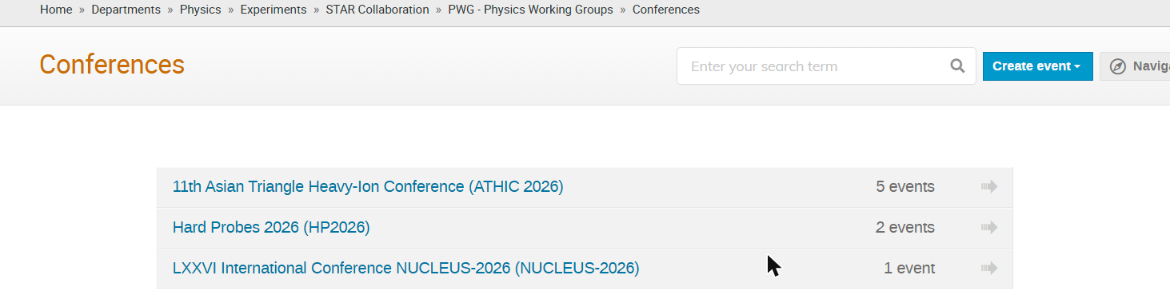
Open the STAR conferences category, then the conference and your PWG. If they are missing, ask the PWG conveners and the PAC to create them.
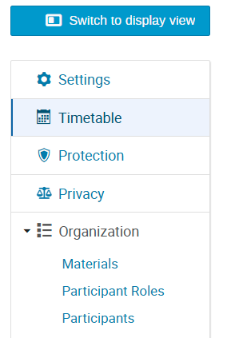
Click the pencil icon in the top toolbar (Switch to the management area), then Timetable.

Add new → Contribution. Title:
John Doe: Measurement of .... Save, then Switch to display view.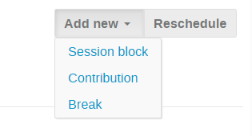
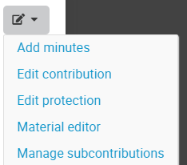
Next to your talk, open the pencil menu, choose Material editor and upload the slides.
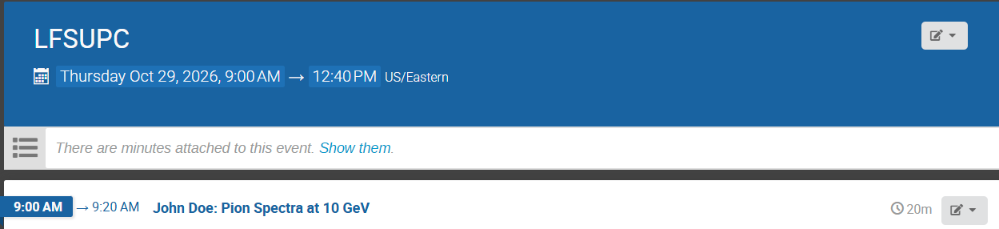
The result looks like this (example event):
Ask for review
Email the PWG conveners:
Subject: STAR presentation by John Doe for Quark Matter 2027 submitted for review Slides: https://indico.bnl.gov/event/<id>/contributions/<id>/- Update the slides on Indico after the comments.
- When the conveners approve, they forward the email to STAR-talks. The PAC then reviews the talk as usual.